
Salta al contenuto

Documentation BI4H (EN)Documentation BI4H (EN)

  • Quick Start
  • Navigation
  • Interactions
  • Charts
  • Tables
  • Filters
  • Modules
  • Data Explorer
  • Self service
  • Quick Start
  • Navigation
  • Interactions
  • Charts
  • Tables
  • Filters
  • Modules
  • Data Explorer
  • Self service
  • Quick start

    • Start up

    • Version

    • Profile

    • Top tool bar

      • Change theme layout
      • Language selection
    • Elements of BI4H

    • What is the HUB

    • What is the APP

    • What is a module

    • Release

      • BI4H 5.6.0
      • BI4H 5.5.0
      • BI4H 5.4.0 (Beta)
      • BI4H 5.3.0
  • Navigation

    • Tiles & child buttons

    • Navigation bar

    • Stepper

    • Sidenav

    • Bookmarks

    • Schedule

    • Global search

  • Interactions

    • Point & click interaction

    • Change chart type

    • Export widgets

    • Fullscreen

    • Additional details

    • Modal windows

  • Charts

    • Lines

    • Colums

    • Composed lines-columns

    • Bars

    • Area

    • Bubble

    • Pie

    • Heatmap

    • Funnel

    • Treemap

    • Geographical maps

    • Gauge

    • Scatter plot

    • Range

    • Sankey

    • Radar

    • Boxplot

  • Grids

    • Grids option

    • Simple grid

    • Group grid

    • Pivot grid

    • Editable grid

      • Usercase1 : A simple update note for the client
      • Usercase2 : Dynamic configuration management
      • Usercase 3 : Flexible Age Range Configuration for Data Analysis
  • Filters

    • Smart Filter Bar

    • Filter layout

      • Single filter
      • Group filter
      • Expanded filter
      • Tree filter
      • Builder filter
      • Search filter
    • Filter types

    • Filter options

    • Interactions

  • Modules

    • Numbers

    • Tab

    • Buttons

    • Chatbot

    • List Indicator

    • Street maps

    • Aid to interpretation

  • Data Explorer

    • Introduction

    • Configuration

      • Edit module -> Generals
      • Edit module -> Aspect
      • Edit module -> Sharing
    • Create a new query

      • Add fields from Univers
      • Add fields from tables/snippets
      • Add a custom measure
      • Conditions sections
      • Advanced mode
    • Existing query

      • Run an existing query
      • Create a query using existing query
      • Organize your queries
    • Sharing

      • Share a query
      • Run a shared query
    • Export results

  • Self service

    • Your first dashboard

      • Adding a new page to the app
      • Adding modules to the page
    • Edit Module -> DATA tab

      • Dimension & Alternative Dimension
      • Measures & Alternatives Measures
      • Categories for alternative data
      • Name of dimensions & Measures
      • Sorting of Dimensions & Measures
      • Visibility of Dimensions & Measures
      • Measures Formatting
      • Measures Threshold
    • Edit Module -> ASPECT tab

      • Title customization
      • Show Legend & Customization
      • Box colors
      • Split module
      • Box Options
      • X Axis
      • Y Axis
      • Chart Colors
      • Type (Rotate, Invert, stack)
      • Zoom
      • Tooltip
      • Average
      • Values
      • Change type
      • Other (Aspect)
    • Edit Module -> INTERACTIVITY tab

      • Action
      • Filters
      • Data
      • Other (Interactivity)
    • Edit page - Generals tab

    • Edit page - Options tab

      • Options (Page)
      • Filters (Page)
    • Edit page - Info tab

    • Edit page - Other tab

    • Rendering examples

      • Column chart combined with a line
      • Stacked chart
      • Chart with opposite axis
      • Chart with a constant line
  1. Docs
  2. Grids
  3. Simple grid

Simple grid

Reading time:

Simple grids show data as Excel-like layout with rows and columns.
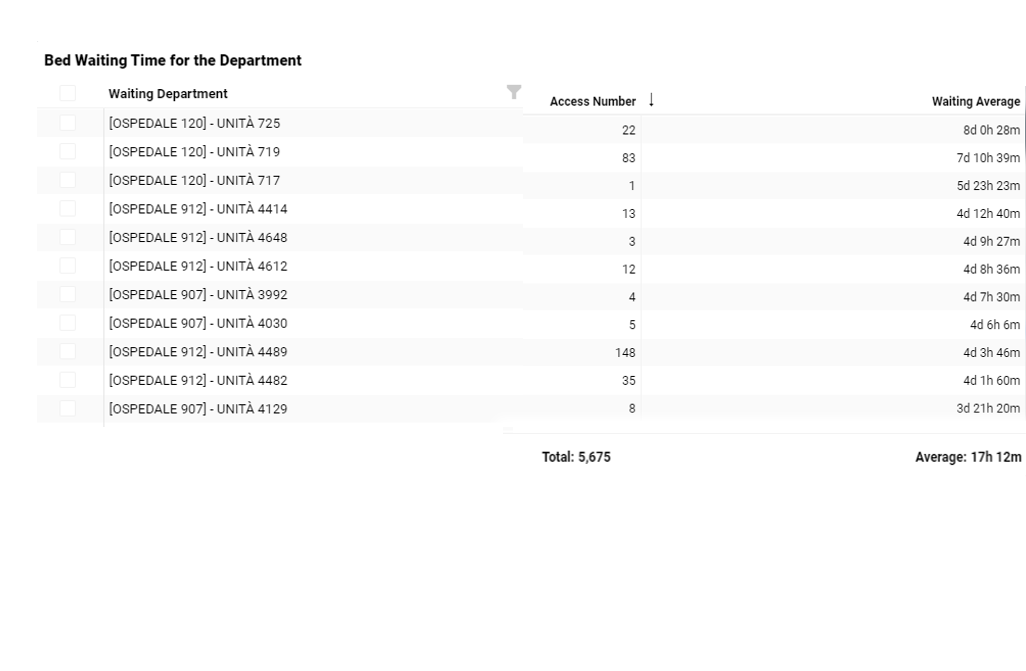
If there are selection boxes (on the left) on each row, it'll be possibile to select/unselect one or more rows at time to enable filters.

To select/unselect all rows, click on the box on the header of the table.
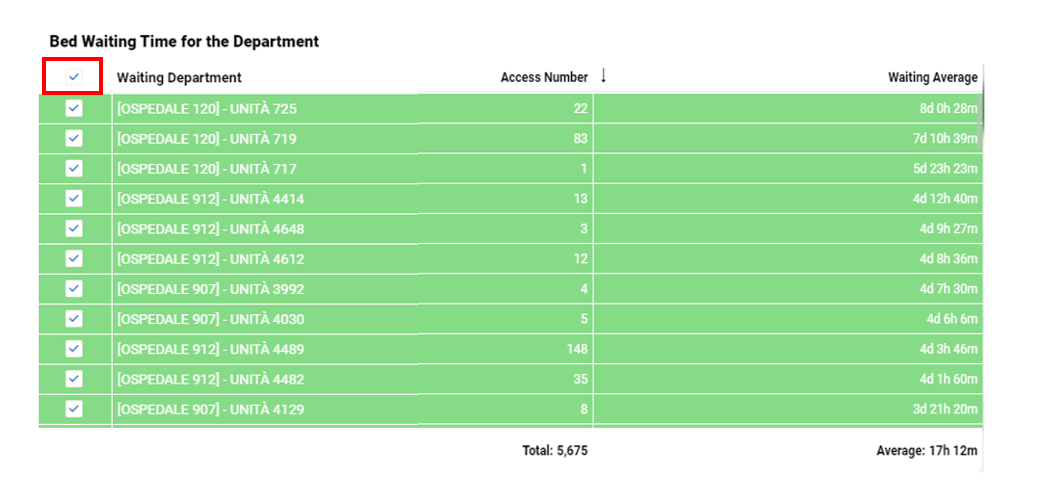

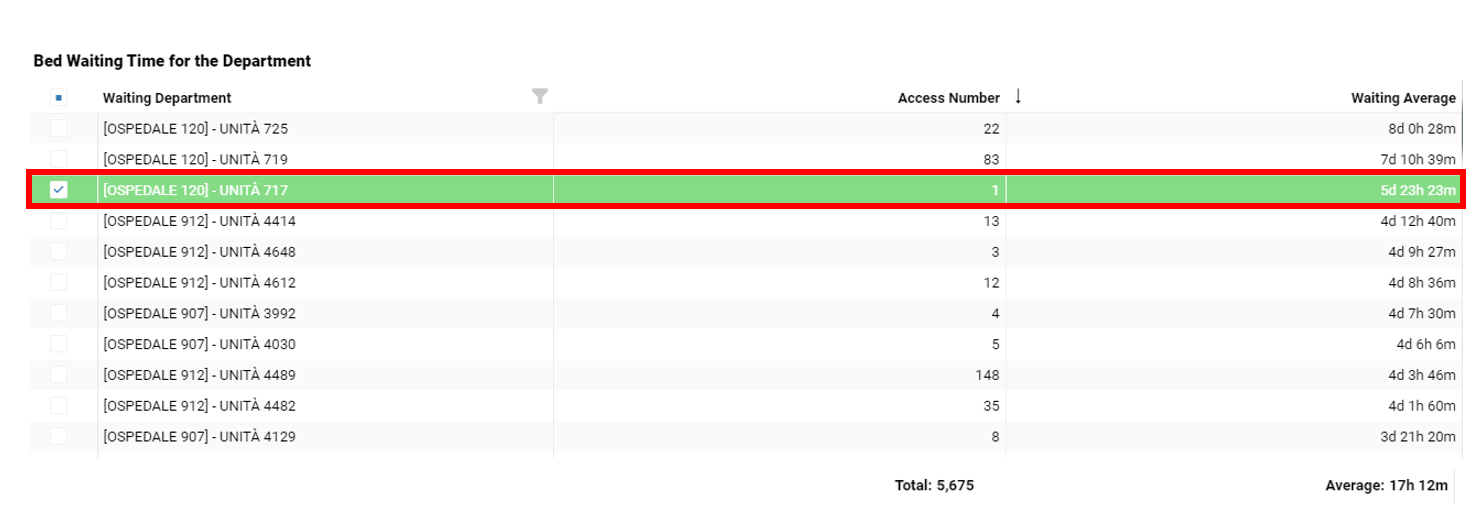
If this is not available, the selection can be done for one row at time when the row highlights.

To disable the selection done, click again on the row highlighted.


Starting with version 5.6.0, the 'Transpose table' option is available in the aspect section of simple grid.

Here is an example when 'Transpose table' is enabled :


This section is reserved for people who have the 'Editor' role.

How to add and configure a simple grid?

Add a simple grid module.

option : column groups

you can add column groups to simple grid to group the information

Last update: 6 February 2026
Views: 697

© 2026 Documentation BI4H (EN)

Powered by WordPress

All'inizio ↑ Su ↑